
Creating content on social media could be hard for those who don’t have an effective strategy. Today, you might have lots of things that you can post, but tomorrow, you may find yourself clueless about what to publish. Here, social media calendar comes to rescue.
The social media calendar is a tool that allows you to schedule your future posts by describing what you are going to post, where it is going to be published, and when it should be published. For small businesses, this easy to implement planning system saves much of the time spent on marketing on social media.
Here, you will learn how to create your own social media calendar from scratch, what data it should contain, and how to use it.
What Is a Social Media Calendar?
A social media calendar is a schedule used to organize your social media content.
It can include important details such as:
- Date and time of the post
- Social media platform
- Content topic
- Caption
- Image or video
- Hashtags
- Link
- Call to action
- Content status
You can create a social media calendar using a spreadsheet, notebook, calendar application, or content-planning tool.
The main goal is simple: know what you are going to post before it is time to post it.
Why Is a Social Media Calendar Important?
Random posting will make your social media marketing quite stressful. However, using a calendar will help you have a definite plan.
Below are some of the benefits of using a calendar.
1. Time Saving
Rather than spending every day thinking of the next post, you will be able to plan multiple posts together.
For instance, you may take an hour in the weekend to plan your posts for the coming week.
2. Keeps You Consistent in Posting
Consistency is very essential when developing your online presence.
With the help of a social media calendar, you will be able to remember what you had planned to post and hence stay consistent.
3. Will Help You Create Good Content
Planning ahead gives you more time to create relevant images, videos, and other content.
You won’t have to rush at the last moment just to upload something on the social media platform.
4. Will Help You Market Your Business
Through a calendar, you can easily plan marketing content for various events.
5. Reduces Stress
Having a plan can make social media management much easier.
Instead of asking, “What should I post today?” you can simply check your calendar.
How to Create a Social Media Calendar
Developing a social media calendar does not have to be difficult. You can begin by making a basic spreadsheet and then make improvements along the way.
Here is how it can be done.
Step 1: Set Your Social Media Goals
Before making your content, figure out your social media objectives first.
These include:
- Brand awareness
- Website traffic
- Generating leads
- Sales
- Community building
- Getting more engagement
- Educating your audience
For instance, if you are running a small clothing line, you may choose social media to raise awareness about your products and drive traffic to your website.
These will guide the type of content that you should make.
Step 2: Understand Your Target Audience
The content on your social media account should always be targeted towards the right people – not your company itself.
Consider who you would like to connect with.
Here are some questions that might help:
- What issues do they face?
- What do they need to know?
- What kind of content do they prefer?
- What social media sites do they visit?
- What are the questions they always ask?
Understanding your audience makes it easier to create useful and relevant content.
Step 3: Choose the Right Social Media Platforms
You don’t have to join all social media networks.
Pick the social media that your target market frequents the most.
For instance:
Instagram: Great for visuals, Reels, products, and lifestyle.
Facebook: Helps build communities, useful for local businesses, etc.
LinkedIn: Great for professional services and B2B businesses.
YouTube: Great for how-tos, educational videos, product demonstrations, and video content.
Begin by selecting just one or two platforms and concentrate on creating quality content regularly.
Step 4: Choose Your Content Categories
Different types of content make sure that your social media feeds remain fresh and engaging.
You can develop a few categories of content, which are also known as content pillars.
For instance, a digital marketing company can use the following categories of content:
- Educational content
- Marketing tips
- News about the industry
- Client testimonials
- Behind the scenes content
- Promotional content
- FAQs
These help in making the process of content creation very easy.
Step 5: Create Your Content Ideas
So, start gathering thoughts for your posts.
Your ideas could come from:
- Questions commonly asked by customers
- Problems common to your industry
- Reviews posted by customers
- Competitor content
- Industry trends
- Blog posts
- Tutorials
- Product features
- Customer success stories
For example, a bakery could create posts such as:
- “5 Tips for Choosing a Birthday Cake”
- “Behind the Scenes of Our Bakery”
- “Our Most Popular Cake Flavours”
- “How We Make Our Chocolate Cake”
- “Customer Favourite of the Week”
Keep a list of ideas so you always have something to work with.
Step 6: Decide How Often You Will Post
There is no single posting schedule that works for every business.
Choose a schedule that you can maintain consistently.
For example:
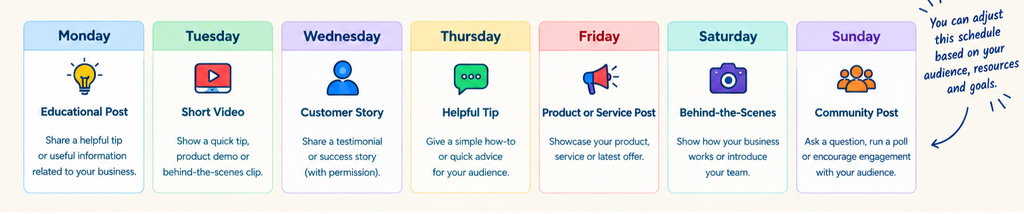
You can change this schedule based on your audience, resources, and results.
Step 7: Add Everything to Your Social Media Calendar
Now put your content ideas into your calendar.
A simple social media calendar can include these columns:
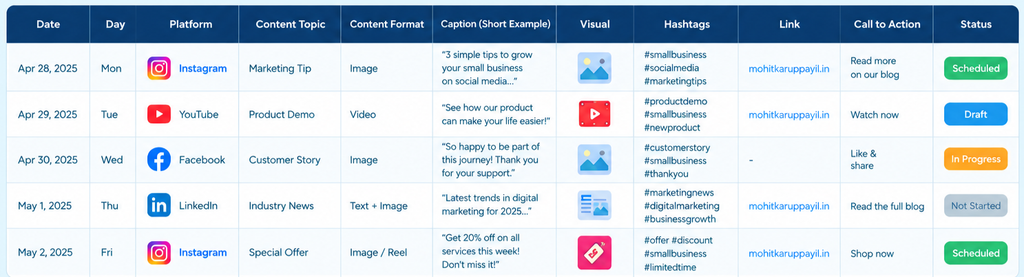
This gives you a clear overview of your upcoming content.
Step 8: Write Your Captions in Advance
Captioning your images at the last moment may take longer than you think.
Instead, plan on creating captions while developing your content.
A basic structure for a caption is:
Hook → Value → Call to Action
Example: “Finding it hard to reach out to customers via social media?
Try these three social media hacks that will boost your visibility…
And which one of these will be your go-to hack?”
Step 9: Prepare Your Images and Videos
Your calendar must also list the kind of visual content required for each post.
You may get ready:
- Photos
- Graphics
- Reels
- Short videos
- Carousels
- Infographics
- Demonstrations of products
Being prepared in advance can speed up your process.
Step 10: Schedule Your Posts
When your content is already prepared, you can schedule your posts through social media scheduling tools.
This enables you to plan many posts in advance.
This is particularly beneficial for small businesses since it helps you create content in bulk rather than work on social media daily.
Nevertheless, it is crucial that you review your scheduled posts prior to their publication.
What Should You Include in a Social Media Calendar?
Elements that can be included in a social media calendar include:
- Publication Date
- Publication Time
- Platform
- Topic of Content
- Format of Content
- Caption
- Image/Video
- Hashtags
- Weblink
- Call to Action
- Status of Content
Not all columns are necessary when you are just getting started.
Social Media Content Ideas for Small Businesses
Here are some suggestions for you in case you are unsure of what to include in your calendar:
Educational Posts
Educate your audience about your business through posts.
Tips and Tricks
Include short tips which could be helpful for solving problems faced by your customers.
Behind-the-Scenes
Take your audience behind the making of your products.
Customer Stories
Post customer stories, testimonials, or success stories with their permission.
Demonstrations
Let your audience know about the functionality of your product through demonstrations.
FAQs
Transform your frequently asked customer questions into social media posts.
Promotions
Include information related to your promotional events.
User-Generated Content
Include user-generated content.
How Often Should You Update Your Social Media Calendar?
It is necessary to look through your calendar on a regular basis.
Weekly reviewing of the calendar will help you:
- Inspect future posts
- Discover any missing material
- Modify the out-of-date information
- Introduce new ideas
- Review recent performance
Alternatively, you may plan your content calendar on a monthly basis.
What matters most is to find a system that suits you.
Common Social Media Calendar Mistakes to Avoid
A good calendar does not mean that everything will be great.
Let’s take a look at common calendar mistakes.
Only Posting Marketing Material
The audience does not want to see advertisements all the time.
Combine marketing with educative, entertaining, and beneficial posts.
Disregarding the Audience
Do not make posts simply because you are interested in the topic. Consider its usefulness
for the target audience.
Utilizing All Available Platforms
It is hard to make good posts while working with a lot of platforms.
Consider your needs and the nature of your business.
Never Analysing the Results
A calendar shows you what was planned to post. Analytics show you what was successful.
Check engagement rate, reach, clicks, leads, and other relevant information.
Too Complex Calendar
A calendar should simplify things.
Try to start with something easy and then develop it.
How to Measure Your Social Media Calendar Performance
Once your content is posted, observe how your target audience reacts.
Some good parameters to consider are:
- Reach
- Impressions
- Likes
- Comments
- Shares
- Saves
- Profile views
- Click-throughs to website
- Lead generation
- Conversion rate to sales
- Find some patterns.
For instance, if educational videos are getting more engagements compared to promotion
pictures, it might be a good idea to make more educational videos.
But that doesn’t necessarily mean that you will cease making other types of content.
Final Thoughts
Knowing how to develop a social media calendar will make social media marketing simpler
for the business.
There is no need for an expensive software program or complicated techniques. Begin by
creating a simple calendar, selecting the channels, learning about the target audience,
planning various types of content, and scheduling posts.